1. Article purpose[edit | edit source]
This article presents an STM32MP2 solution from STMicroelectronics to strengthen Android security mechanisms. A first level of enforcement is already provided through the use of a Trusted Execution Environment (TEE), specifically Trusty.
Several hardware interfaces have been defined in Trusty to communicate with secure hardware components, including the HW IP, Secure Element (SE), and Hardware Secure Module (HSM), with a particular focus on secret management.
Thanks to the STM32MP2 architecture, Android security enforcement can be extended by combining the M33 processor, the HW IP, and the M33-TD flavor  configuration. In this solution, the Trusty hardware interfaces are exposed with security services compliant with the PSA interface, processed by the M33 through the TF-M firmware.
The main objective is to integrate the software components required to use the M33 subsystem as a security service provider, for example for key backup and cryptographic operations.
This reference implementation must be adapted to the specific requirements of your Android project.
2. Software architecture[edit | edit source]
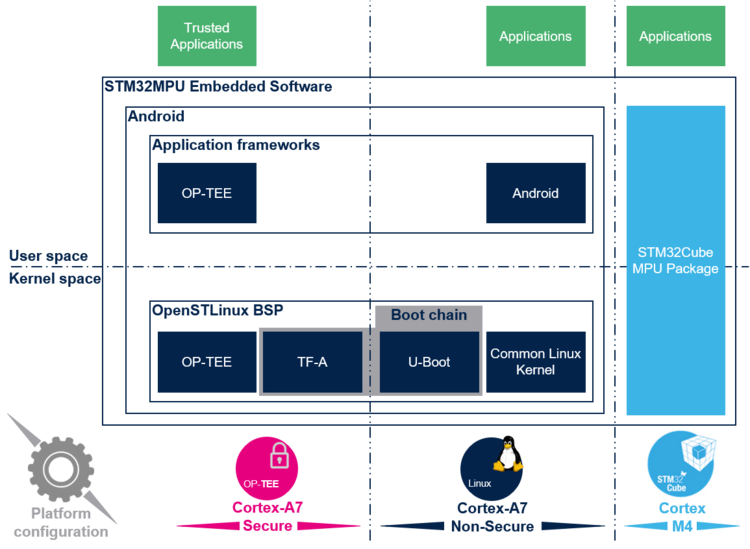
OpenSTDroid is using the M33-TD flavor . In this context, several secure IPs are controlled by the Cortex®-M33 trusted firmware TF-M. The Cortex®-A35 secure OS is Trusty.
2.1. M33 TF-M[edit | edit source]
Using Cortex®-M33 as the main processor, the resources management and security services are executed by the Cortex®-M33 via the TF-M running in the Cortex®-M Secure context.
TF-M offers secure services :
- Secure storage
- Crypto services
- Initial attestation
- Firmware update
- Debug authentication
These services are linked to dedicated secure partitions embedded in the TF-M firmware to provide the services. TF-M uses PSA API to define the infrastructure of the services.

In Trusty, the TF-M Crypto services is integrated via the PSA Crypto API [1]. The PSA services are exported to the Cortex®-A35 through IPCC and shared resource management (SRAM and mailbox).
PSA ITS (Internal Trusted Storage) uses the backup memory BKPSRAM. PSA PS (Protected Storage) support depends on the board hardware configuration; for example, it may use sNOR or eMMC (RPMB).
The Crypto services rely on the Mbed TLS software component and hardware IP blocks such as CRYP,HASH,PKA,RNG, and SAES.
Isolation and secret protection are achieved through the RIF (Resource Isolation Framework), the privileges of the Cortex®-M33 processor in the M33-TD flavor , the use of OTP via BSEC to store secrets, and the capabilities of SAES.
For more details see the wiki page TF-M overview
Because of the M33-TD flavor , the BSEC IP is controlled exclusively by the Cortex®-M33. The access to the other Secure Hardware IP on STM32MP25x lines  are configured with the RIF by the Cortex®-M33, the default allocation for Runtime is defined in the following table:

2.2. Trusty[edit | edit source]
Trusty is a secure operating system used to implement a Trusted Execution Environment (TEE) for Android. It runs on the same processor as Android, but is isolated from the rest of the system through hardware-backed separation and supporting software mechanisms.
Trusty uses ARM TrustZone to partition the processor and create a secure execution environment. Its architecture typically includes a small OS kernel derived from Little Kernel, a Linux kernel driver that enables communication between Android and the secure world, and user-space libraries that interact with trusted applications through that driver.
Trusted applications such as Storage, KeyMint, and Gatekeeper provide services used by Android security features, including hardware-backed key management, authentication, secure storage, and device integrity functions.
For Verified Boot, the bootloader U-Boot integrates AVB support and communicate with the AVB trusted application in Trusty to access protected secrets or device-specific state.
For more details see the website Android Trusty TEE[2]

- Vold: provides the functionality for managing storage devices and volumes on Android (mounting).
- FBE: File Base Encryption allows different files to be encrypted with different keys that can be unlocked independently.
- HW wrapped keys: Is a storage key uses for encryption only know in clear by a dedicated hardware.
- LockSettingServices: process for authentication based on credential
- Keystore: Android system daemon to manage secrets, here it is a Hardware backed keystore processed by Trusty in TEE.
- StorageProxyd: Android system daemon for file storage in RPMB.
- GateKeeper: subsystem for authentication.
- Keymint: subsystem for cryptographic services.
- hwwsk: hardware wrapping storage key.
- hwkey: hardware key management.
- storage: eMMC RPMB storage.
The Trusty base keys include the RPMB authentication key (HMAC, SHA-256), to store in OTP and in the eMMC key slot and the Trusty master device key (HKDF, SHA-256) to store in OTP, which is used to derive application keys.
2.3. Trusty base keys OTP mapping[edit | edit source]
For the protection of Trusty base keys, new OTP slots have been added to the reference mapping defined in the wiki page STM32MP23-25 OTP mapping.
| For M33-TD flavor
| ||
|---|---|---|
| OTP word | Name | Description |
| 268 | RPMB-KEY0 | RPMB eMMC authentication key[key-formats 1] |
| 269 | RPMB-KEY1 | RPMB eMMC authentication key[key-formats 1] |
| 270 | RPMB-KEY2 | RPMB eMMC authentication key[key-formats 1] |
| 271 | RPMB-KEY3 | RPMB eMMC authentication key[key-formats 1] |
| 272 | RPMB-KEY4 | RPMB eMMC authentication key[key-formats 1] |
| 273 | RPMB-KEY5 | RPMB eMMC authentication key[key-formats 1] |
| 274 | RPMB-KEY6 | RPMB eMMC authentication key[key-formats 1] |
| 275 | RPMB-KEY7 | RPMB eMMC authentication key[key-formats 1] |
| 276 | TRUSTY-DV-MK0 | Trusty device master key[key-formats 2] |
| 277 | TRUSTY-DV-MK1 | Trusty device master key[key-formats 2] |
| 278 | TRUSTY-DV-MK2 | Trusty device master key[key-formats 2] |
| 279 | TRUSTY-DV-MK3 | Trusty device master key[key-formats 2] |
| 280 | TRUSTY-DV-MK4 | Trusty device master key[key-formats 2] |
| 281 | TRUSTY-DV-MK5 | Trusty device master key[key-formats 2] |
| 282 | TRUSTY-DV-MK6 | Trusty device master key[key-formats 2] |
| 283 | TRUSTY-DV-MK7 | Trusty device master key[key-formats 2] |
To learn how the Trusty base keys were added in the OTP key management process by the TF-M firmware, please refer to the wiki page How to manage keys and secrets in TF-M.
To fuse the RPMB-KEY slots and RPMB eMMC key slot we suggest to use the rpmb-provisionning tool. Refer to the paragraph RPMB authentication key setting.
To fuse the TRUSTY-DV-MK slots you can use the stm32key tool, refer to the paragraph Trusty Device Master Key setting.
2.4. RPMB authentication key setting[edit | edit source]
The Replay Protected Memory Block (RPMB) provides a secure area in which data integrity is ensured through authentication. The RPMB authentication key must be programmed into the RPMB controller component of the eMMC.
 Information Information
|
| Note that this key must be programmed only once, according to the RPMB specification. During the programming command/request, the RPMB key is sent in cleartext; therefore, it must be provisioned in a secure environment. |
On Host the RPMB key has to be protected in final product.
- To update the dummy RPMB key OTP value in the M33 TF-M source code:
- Update the dummy RPMB key OTP in
device/stm/stm32mp2-system/tf-m-stm32mp2/platform/ext/target/stm/common/stm32mp2xx/secure/otp.c. - Execute the command to get the
psa_rot_prov_data .rpmbkvalue:
- Update the dummy RPMB key OTP in
hexdump -v -e '/1 "%02x"' your_rpmbkey.bin | sed 's/../0x&,/g'
To modify the component System, follow the process described in the wiki page How to build system firmware for Android
- To fuse the RPMB key OTP:
- Copy your RPMB key file to the directory
/device/stm/stm32mp2/security/keys
- Copy your RPMB key file to the directory
 mkdir -p /device/stm/stm32mp2/security/keys
 cp your_rpmbkey.bin /device/stm/stm32mp2/security/keys/rpmbk.bin
- Execute the script
rpmb_provisioningand follows the instructions displayed:
- Execute the script
rpmb_provisioning
| Information
|
The rpmb_provisioning tool allow to flash the RPMB key in the eMMC slot key AND/OR the OTP.
|
2.5. Trusty Device Master Key setting[edit | edit source]
The "Trusty device master key" is used in the derivation of keys required by Android frameworks.
- To update the dummy Trusty device master key OTP value in the M33 TF-M source code:
- Update the dummy Trusty device master key OTP in
device/stm/stm32mp2-system/tf-m-stm32mp2/platform/ext/target/stm/common/stm32mp2xx/secure/otp.c. - Execute the command to get the
psa_rot_prov_data .trusty_dv_mkvalue:
- Update the dummy Trusty device master key OTP in
hexdump -v -e '/1 "%02x"' your_trusty_dv_k.bin | sed 's/../0x&,/g'
To modify the component System, follow the process described in the wiki page How to build system firmware for Android
- To fuse the Trusty device master key OTP refer to the wiki page How to provision secrets for Android.
3. Android integration[edit | edit source]
3.1. Software[edit | edit source]
The software components added and updated in the Android-based OpenSTDroid distribution are :
- The M33 TF-M firmware in the directory
device/stm/stm32-system - The STMicroelectronics extension of the Trusty services in the directories
trusty/hardware/st: the hardware servicestrusty/device/st/stm32mp2: the device project configuration
3.2. Configuration & Build[edit | edit source]
The use of Trusty in the OpenSTDroid distribution is indicated by the flag BOARD_SECURITY defined in the file device/stm/stm32mp2/eval/aosp_eval.mk or device/stm/stm32mp2/dk/aosp_dk.mk.
The Trusty security enforcement with The Cortex-M33 subsystem is activated. The activation of the enforcement is indicated by the flag WITH_ST_HWCRYPTO in file trusty/device/st/stm32mp2/project/stm32mp2-inc.mk.
The U-Boot Android Verified Boot (AVB) is activated confirmed by the flag BOARD_AVB_ENABLE defined in the file device/stm/stm32mp2/eval/BoardConfig.mk.
If your board has not been provisioned, it will boot thanks to the dummy OTP values defined in the TF-M source code.
The RPMB key is part of this data, so you must update it if necessary, keeping in mind that the current value is the default one used on STM32MP25x lines boards. The default RPMB key file is located at: device/stm/stm32mp2/security/keys/rpmbkey.bin and must be fused on the eMMC.
For more details see the RPMB authentication key setting paragraph.
The Trusty secure operating system is delivered as prebuilt binary in the OpenSTDroid distribution.
If you have to modify the source code of Trusty, the process to rebuild it is described in the wiki page How to build TEE for Android.
4. How to test[edit | edit source]
Android security features can be tested with the following Compatibility Test Suite (CTS) & Vendor Test Suite (VTS).
- CtsKeystoreTestCases
- CtsNativeVerifiedBootTestCases
- VtsAidlKeyMintTargetTest
- VtsHalGatekeeperV1_0TargetTest
- vts_security_avb_test
command example :
vts-tradefed run commandAndExit vts -m vts_security_avb_test
atest CtsKeystoreTestCases
For more details see the website Android Open Source Project (AOSP)[3]
5. How to debug[edit | edit source]
5.1. How to add some traces in the Cortex-M33 TF-M[edit | edit source]
Update the flag TFM-SPM_LOG_LEVEL to the expected level (example TFM_SPM_LOG_LEVEL_DEBUG) in the source code device/stm/stm32mp2-system/tf-m-stm32mp2/platform/ext/target/stm/common/stm32mp2xx/config.cmake.
Refer to the wiki page How to build system firmware for Android.
5.2. How to add some trace in Trusty[edit | edit source]
Trusty logs can be read from the /dev/trusty-logX virtual file and through "kernel log".
Set the flag TLOG_LVL to the expected level (example GLOBAL_DEFINES += TLOG_LVL=5 # TLOG_LVL_DEBUG) in the source code trusty/device/st/stm32mp2/project/stm32mp2-inc.mk.
Refer to the wiki page How to build TEE for Android.
5.3. How to add some traces in Android[edit | edit source]
To permanently add traces for Android software components, modify the init.rc file as follows: Here we are only interested in the components related to Android security functions.
on early-fs
 setprop log.tag.keystore2 VERBOSE
 setprop log.tag.AndroidKeyStore VERBOSE
 setprop log.tag.keymint VERBOSE
6. References[edit | edit source]
6.1. Key storage in OTP[edit | edit source]
Keys are represented as a string of byte to be stored in consecutive OTP words.
For example, a 64-bit key (0xAABBCCDDEEFF5566) is stored into two consecutive OTP words KEY0 and KEY1.
A key is stored in OTP words using one of the following formats:
6.2. Documentary sources[edit | edit source]
- ↑ https://arm-software.github.io/psa-api PSA Crypto API
- ↑ https://source.android.com/docs/security/features/trusty Android Trusty TEE
- ↑ https://source.android.com/docs/core/tests Android Open Source Project (AOSP)
Arm® is a registered trademark of Arm Limited (or its subsidiaries) in the US and/or elsewhere. 