
1. Article purpose[edit | edit source]
The purpose of this article is to:
- Introduce the X-LINUX-TSNSWCH expansion package
- Define the hardware and software deliverables to use the X-LINUX-TSNSWCH expansion package
- Describe all steps to integrate the X-LINUX-TSNSWCH expansion package
2. X-LINUX-TSNSWCH expansion package description[edit | edit source]
2.1. Overview[edit | edit source]
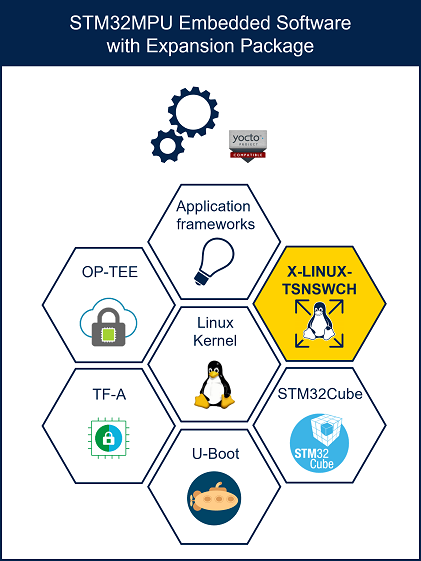
X-LINUX-TSNSWCH is an OpenSTLinux distribution expansion package that targets both the time-sensitive networking (TSN) feature and the hardware Ethernet switch configuration in Linux®.

The X-LINUX-TSNSWCH expansion package is a Yocto layer that provides the necessary resources to generate software for managing time-sensitive networking and the hardware Ethernet switch, at both userland and Linux® kernel levels. It simplifies development to achieve one of the following goals:
- Configure the hardware Ethernet switch and use it with TSN configurations
- Configure the hardware Ethernet switch (also known as the ETHSW internal peripheral) and use it without TSN configurations
- Provide the necessary utilities to configure TSN endpoints
By default, adding this package to your Linux® distribution makes the hardware Ethernet switch ready to use and installs the TSN configuration tools.

2.2. Main software modifications[edit | edit source]
2.2.1. Linux® kernel[edit | edit source]
The X-LINUX-TSNSWCH expansion package provides:
- Two additional kernel modules to enable the hardware for a standard Ethernet switch (compatible for time-sensitive networking):
- The "st-stm32-deip" module to enable hardware clocks and regulators useful for the TSNSWCH internal peripheral
- The "edge" module to enable the TSNSWCH internal peripheral, usable under licenses,
- A specific device tree overlay for TSNSWCH definition
2.2.2. User space additional stacks[edit | edit source]
The X-LINUX-TSNSWCH provides a series of userland tools and components for time-sensitive networking (TSN).
- linuxptp
- iproute2 + TC
- iperf3
- lldp
- mstpd
- net-snmp
- netopeer2-server
- ....
See Ethernet switch overview for more details.
2.3. Versioning[edit | edit source]
The latest version of the X-LINUX-TSNSWCH expansion package (based on third party v1.6.9) is designed to be used with all Yocto-based OpenSTLinux ecosystem release of v6 flow .
2.4. Associated licenses[edit | edit source]
See X-LINUX-TSNSWCH licenses for information on the licenses applied to the X-LINUX-TSNSWCH expansion package.
3. Prerequisites[edit | edit source]
3.1. Hardware prerequisites[edit | edit source]
The X-LINUX-TSNSWCH is designed to be demonstrated on the following target:
- STM32MP257F-EV1

The hardware description for the STM32MP257x-EV1 is available in a dedicated wiki page here.
3.2. Software prerequisites[edit | edit source]
The X-LINUX-TSNSWCH expansion package runs with Yocto-based OpenSTLinux embedded software ecosystem release ≥ v6.0.0  .
.
Prerequisites if you want to use the distribution package: You need to get and install the STM32MPU Distribution Package. The instructions, repeated from the dedicated wiki page, are provided below.
4. Hardware setup[edit | edit source]
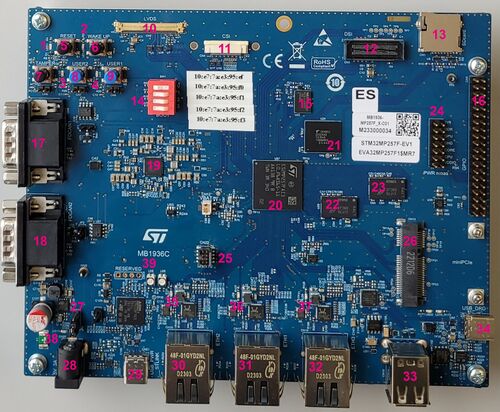

The time-sensitive networking (TSN) switch is available via the two Ethernet ports labeled 31 and 32.
The Ethernet port labeled "30" can be used only as a TSN endpoint.
Ethernet Ports 31 and 32:
- These ports can be used to connect devices requiring accurate timing synchronization, provided by the X-LINUX-TSNSWCH expansion package through the PTP protocol.
- They also support TSN capabilities, such as queuing discipline through Qdisc configuration.
- As explained in the Overview chapter, these ports can also function as standard hardware Ethernet switches without utilizing TSN features.
5. Software setup[edit | edit source]
5.1. How to get software[edit | edit source]
The X-LINUX-TSNSWCH expansion package is available as Starter package and Distribution package.
5.1.1. Starter package[edit | edit source]
- The X-LINUX-TSNSWCH starter package (binaries) is delivered through one tarball file named FLASH-stm32mp2-tsn-openstlinux-6.6-yocto-scarthgap-mpu-v26.06.10.tar.gz applicable to STM32MP257F-EV1 .
- Download and install the X-LINUX-TSNSWCH starter package (binaries):
The software package is provided AS IS, and by downloading it, you agree to be bound to the terms of the software license agreement (SLA0048). The detailed content licenses can be found here.
| X-LINUX-TSNSWCH - STM32MP2-Ecosystem-v6.2.1 release | |
|---|---|
| Download |
Go on st.com to download the X-LINUX-TSNSWCH Starter Package image, FLASH-stm32mp2-tsn-openstlinux-6.6-yocto-scarthgap-mpu-v26.06.10.tar.gz file. |
| Installation |
cd <working directory path>/X-LIUNX-TSNSWCH-Starter-Package
tar xvf FLASH-stm32mp2-tsn-openstlinux-6.6-yocto-scarthgap-mpu-v26.06.10.tar.gz |
| Release note | This article |
5.1.2. Distribution package[edit | edit source]
By following the procedure described in the next sections, you can regenerate the complete distribution by enabling the X-LINUX-TSNSWCH expansion package.
As presented in Software prerequisites, it is assumed that you have already installed the STM32MPU Distribution Package.
5.1.2.1. Install the X-LINUX-TSNSWCH distribution package[edit | edit source]
- Clone the meta-st-stm32mp-tsn-swch git repositories.
cd <Distribution Package installation directory>/layers/meta-st
git clone -b scarthgap https://github.com/STMicroelectronics/meta-st-stm32mp-tsn-swch.git
cd ../..
- Source the build environment with the correct board and layer.
(Example of the STM32MP25x lines  )
)
DISTRO=openstlinux-weston MACHINE=stm32mp2 source layers/meta-st/scripts/envsetup.sh
bitbake-layers add-layer ../layers/meta-st/meta-st-stm32mp-tsn-swch
5.1.2.2. Build the image[edit | edit source]
bitbake st-image-weston
 Information Information
|
| Note that building the image might take a significant amount of time, depending on the performance of the host computer. |
5.2. How to populate the flash memory with the image[edit | edit source]
The build-<distro>-<machine>/tmp-glibc/deploy/images/<machine> directory receives complete file system images.
Build directory structure: images
| Information
|
| This is an example: the files that you will see in your build directory, might slightly differ |
build-<distro>-<machine>/tmp-glibc/deploy
└── images
|   └── stm32mp2
|       ├── flashlayout_st-image-weston		Flash layout files (description of the partitions) for the supported flash devices
|       │   ├── FlashLayout_sdcard_<board name>-optee.tsv	Flash layout file for microSD card and OP-TEE
|       │   ├── [...]
|       │   ├── FlashLayout_sdcard_stm32mp257f-ev1-optee.tsv	Flash layout file for microSD card and OP-TEE → STM32MP257f Evaluation kits
|       │   └── [...]
|       ├── fip					FIP images to flash pointed by flashlayouts
|       │   ├── fip-<board name>-optee.bin
|       │   └── [...]
|       ├── scripts
|       │   └── create_sdcard_from_flashlayout.sh
|       ├── splash.bin				U-Boot splash screen picture (file in BMP format with a .bin extension) for NOR Flash
|       ├── kernel
|       │   ├── uImage				Linux kernel binary image file (with U-Boot wrapper) for bootfs partition
|       │   ├── vmlinux				Debug symbol file for Linux kernel
|       │   └── [...]
|       ├── st-image-bootfs-openstlinux-weston-<machine>.ext4	Binary for bootfs partition
|       ├── st-image-userfs-openstlinux-weston-<machine>.ext4	Binary for userfs partition
|       ├── st-image-vendorfs-openstlinux-weston-<machine>.ext4	Binary for vendorfs partition
|       ├── st-image-weston-openstlinux-weston-<machine>.ext4	Binary for rootfs partition
|       └── [...]
└── [...]
The STM32CubeProgrammer tool is used to program the STM32MPU boards with the built image. It is assumed that this tool has been installed through the Starter Package associated with your board.
Depending on the board, several flash memory devices (microSD, eMMC...) might be available. The microSD card is considered as the flash device in the rest of this article.
The procedure to flash your board is explained in the Starter Package article that corresponds to your board (remember that all articles relative to Starter Packages are found in Category:Starter Package):
Once the flashing is terminated, the boot switches must be configured so that the Flash device (e.g. microSD card) on which the image has been flashed, is selected as the boot source:
5.3. How to run the X-LINUX-TSNSWCH package software[edit | edit source]
See How to configure Ethernet switch and How to configure TSN switch.
5.4. How to trace and debug[edit | edit source]
See How to configure Ethernet switch and How to configure TSN switch.
6. How to run use case[edit | edit source]
This part will be completed later.
In the meantime, you can find information in How to configure Ethernet switch and How to configure TSN switch.
7. References[edit | edit source]